


- 首頁
- Blog
- The Complete Guide to Image SEO: Turning Images into Traffic Powerhouses and Doubling Your Website Visits!
The Complete Guide to Image SEO: Turning Images into Traffic Powerhouses and Doubling Your Website Visits!
2025 / 11 / 28
Have you ever considered images as merely decorative elements on a web page?
With the rapid advancement of AI technology, modern search engines can not only read text but also "parse" image content and incorporate it into search results. This means optimizing Image SEO can significantly boost image exposure, enhance user experience, and drive sustained traffic to your website!
• Achieving higher rankings in Google Image Search results
• Appearing as "Rich Snippets" in standard web search results to attract more clicks
• Generating additional organic traffic for the website
• Enhancing user experience and content relevance, thereby strengthening the website's overall SEO performance
In short, Image SEO aims to help search engine crawlers correctly "understand" image content and determine its high relevance to user search intent, leading to better rankings. Especially with the increasing visual nature of search results and the blurring lines between text and multimedia, Image SEO has become a crucial strategy for boosting website exposure.
So, where do optimized images typically appear? They can primarily be categorized into three scenarios:
▼ Dedicated Google Image Search Results Page
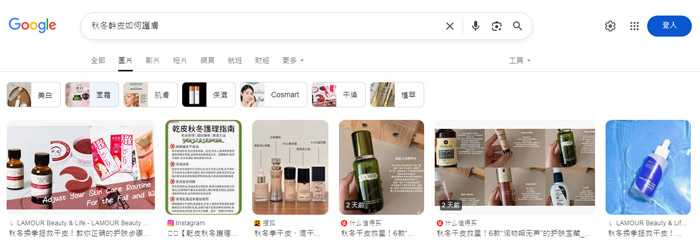
▼ Image Blocks within General Search Results
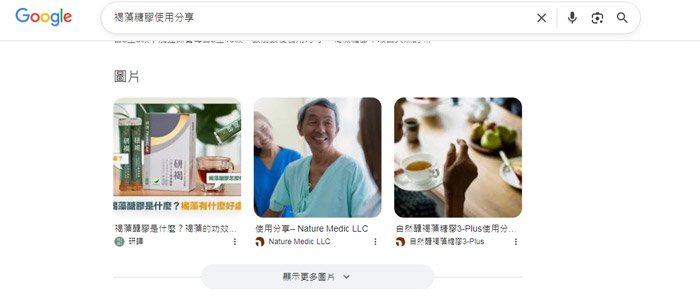
▼ Rich Snippets in Web Search Results
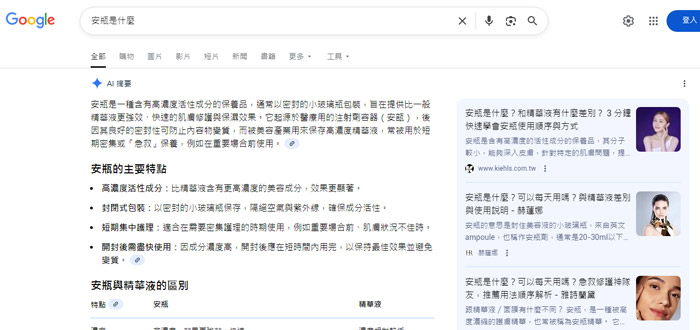
The operational workflow of an image search engine is similar to that of a web search engine, involving three main stages: Crawling, Indexing, and Ranking. Google first confirms "whether the image can be crawled," then determines "whether its content can be understood," and finally evaluates the image's relevance to the user's search intent based on various factors, displaying qualifying images in the search results.
Therefore, to ensure your website images appear in search results, you must master these two key aspects:
■ Ensure Google Can "Find" Your Images
If images have access restrictions or are located on pages blocked by robots.txt, Google's crawler will be unable to fetch them. Additionally, some websites use JavaScript to load images dynamically (e.g., images not present in the initial code, loaded only when the user scrolls to a specific section), which can also impact the crawler's efficiency.
To ensure images are successfully detected and crawled by Google, consider the following measures:
— Confirm that the page hosting the image is not blocked by robots.txt
— Include image information in your Sitemap
— Use structured data markup (e.g., Schema.org's ImageObject)
— Avoid large image file sizes causing load timeouts, leading the crawler to abandon the fetch
■ Help Google "Understand" Your Image Content
Even if an image is successfully crawled, it doesn't guarantee Google can correctly interpret its content. Since search engines primarily rely on textual cues to understand visuals, optimizing the following elements is essential: File Name, Alt Text, Image Title, surrounding paragraph descriptions, and Captions.
It's recommended to closely align images with the topic of relevant paragraphs and supplement them with descriptive surrounding text to effectively assist Google in accurately parsing the image's meaning.
How to Implement Image SEO? Turning Every Image into a Website Traffic Entry Point
Image SEO is a key strategy for improving search rankings and overall page performance. The following section details specific implementation methods across five key areas:
■ Craft High-Quality Alt Text to Enhance Page Content
The img alt attribute in HTML is the "alternative text" for the img tag, used to describe the image content. When an image fails to display, browsers show this text, giving users an idea of the image's subject. It is also crucial for SEO and accessibility, helping search engines understand the image and enabling screen readers to convey information to visually impaired users. Core principles for writing effective Alt Text:
— Concisely and accurately describe what the image actually shows
— Naturally incorporate target keywords, avoiding stuffing
— Ensure Alt Text is relevant to the content surrounding the image, reinforcing thematic consistency
— Keep length under 125 characters, avoiding lengthy, complex descriptions
■ Optimize Image Filenames, Formats, and Size Settings
Before uploading images, many administrators overlook two critical details: "File Naming" and "Format Selection." These not only affect how search engines understand the content but also directly impact page load speed and user experience.
【File Naming Strategy】
The filename is the primary clue for search engines to interpret the image's topic. Avoid meaningless default names (e.g., IMG_001.jpg) and use descriptive filenames to enhance SEO.
Key points of optimization:
— Use hyphens to separate words, e.g., "seo-optimization-tools.jpg"
— Naturally incorporate target keywords, maintaining fluent semantics
— Keep filenames concise for easy identification and indexing
【Image Format Selection】
Choosing the correct image format effectively reduces file size while maintaining clarity, speeding up website loading:
JPEG: Suitable for photographs and images with complex colors
PNG: Use when transparency is needed
WebP: A modern format recommended by Google, offering superior compression and better quality retention
SVG: The preferred choice for logos, icons, and vector graphics
【Image Dimensions and Compression Techniques】
Oversized image files can slow down website loading, especially on mobile devices. Before uploading, consider the following processing:
— Adjust width and height according to the actual display size, avoid relying solely on CSS for forced scaling
— Use compression tools (e.g., TinyPNG, Squoosh) to reduce file size while maintaining visual quality
— Aim to keep images under 200KB, prioritizing WebP or AVIF formats
— Implement responsive images (via the srcset attribute) so different devices automatically load the most suitable image version
Through appropriate naming strategies, format selection, and size adjustment, you can not only enhance search visibility but also provide users with a smoother browsing experience.
■ Strengthen Semantic Relevance and Contextual Link with Surrounding Text
From a search engine's perspective, images do not exist in isolation but form a complete information unit together with the surrounding textual content. Whether an image resonates with the paragraph content, headings, and captions directly influences Google's judgment of its topic.
When placing images, position them close to relevant paragraph content. For example, place a screenshot directly next to its corresponding tutorial step, rather than grouping all images at the end of the article, ensuring coherent context between text and images.
Furthermore, if an image exists alone on a page lacking content, Google will struggle to determine its topic and relevance, potentially affecting its recognizability in search results. Images should be placed on text pages with clear themes, ensuring that surrounding textual content (including captions, preceding/subsequent subheadings, table titles, or paragraph descriptions) effectively supplements the visual semantics, helping search engines accurately interpret the image's purpose and contextual meaning.
Finally, leverage structured data. If an image is the article's primary image or a product photo, add corresponding structured markup (e.g., Article, Product) to the page to help Google understand the image type, further enhancing exposure in search results.
■ Use Images Legally and Clearly Indicate Sources
While pursuing visual appeal and SEO optimization, "licensing legitimacy" is a critical link that cannot be ignored. Using unauthorized images can not only lead to legal risks but also severely damage brand reputation.
To ensure content safety and professionalism, prioritize using original images, branded photographic materials, or licensed resources from legitimate stock libraries. If using stock library materials, be sure to attribute the source or license conditions, for example, clearly stating "Image Source: Pexels," conveying content legality and transparency to your readers.
Additionally, consider embedding license-related metadata (Image Metadata), such as creator name and terms of use. This way, when the image appears in Google Image search results, it may display a "Licensable" badge, potentially increasing click-through rates and strengthening user trust in the website.
Regardless of the image source, complying with license terms and correctly attributing ownership is not only a legal requirement but also the foundation for building website authority and long-term trust.
■ Optimize Mobile Experience and Loading Speed
In the mobile-first era, image performance on mobile devices directly impacts user experience and search rankings. To leverage this advantage, optimization must focus on two main aspects: "Display Performance" and "Loading Speed."
【Key Points for Mobile Image Optimization】
Implement Responsive Design: Ensure images automatically adapt to different screen sizes, displaying completely and clearly on any device.
Adopt Next-Gen Image Formats: Prioritize modern formats like WebP, effectively reducing file size while maintaining high quality.
Enable Lazy Loading: Use Lazy Loading to delay loading images not immediately visible, allowing core page content to load first.
Optimize Touch Interaction: Ensure all interactions with images on touch devices (like zooming and swiping) are smooth and precise.
【Ultimate Speed Optimization Strategies】
Leverage Content Delivery Networks: Use CDNs to deliver images quickly from global nodes, shortening the distance between users and files.
Enhance Browser Caching Settings: Properly configure image caching rules so returning users experience near-instantaneous image loads.
Embrace Advanced Image Formats: Consider adopting next-generation formats like AVIF, which can offer even better compression efficiency and visual quality than WebP.
■ Using the Same ALT Text for Every Image
Using identical ALT text for all images (e.g., "Company Product" or "Service Image") to save time not only wastes Image SEO opportunities but may also be seen as a low-quality signal by Google.
Solution: Create unique, descriptive ALT text for each image that accurately reflects its specific content.
■ Using Meaningless Filenames or Codes
Using default filenames generated by cameras or design software (e.g., DSC_1234.jpg) or meaningless codes as filenames prevents Google from extracting content clues from them.
Solution: Establish a unified image naming convention ensuring each filename accurately describes the image content.
■ Oversized Hero Image Files
Using uncompressed large images as hero images significantly increases page load times, raises bounce rates, and negatively impacts search rankings.
Solution: Strike a balance between quality and file size. Use compression tools and consider providing appropriately sized images for different devices.
■ Low Relevance Between Images and Text Content
Images lacking association with surrounding text, or placed arbitrarily within unrelated content, can confuse search engines about the image's topic.
Solution: Ensure each image is highly relevant to the surrounding textual content and introduced naturally within the context.
■ Using Unauthorized Images or Failing to Attribute Sources
Using others' images without permission, or using Creative Commons licensed images without proper attribution, can lead to legal disputes and search engine penalties.
Solution: Establish an image usage review process ensuring all images have legal authorization and are attributed as required.
In an increasingly competitive digital space, Image SEO offers a relatively unsaturated opportunity area. By systematically implementing the strategies outlined in this article, you can transform the images on your website from passive decorative elements into active traffic generators.
Remember, successful Image SEO is not just about technical optimization; it's about creating valuable, relevant visual content and ensuring this content can be effectively discovered and understood by your target audience and search engines.
With the rapid advancement of AI technology, modern search engines can not only read text but also "parse" image content and incorporate it into search results. This means optimizing Image SEO can significantly boost image exposure, enhance user experience, and drive sustained traffic to your website!
What is Image SEO? Where Do Optimized Images Typically Appear?
Image SEO refers to a series of search engine optimization techniques aimed at improving an image's ranking and visibility in search results. Its primary objectives include:• Achieving higher rankings in Google Image Search results
• Appearing as "Rich Snippets" in standard web search results to attract more clicks
• Generating additional organic traffic for the website
• Enhancing user experience and content relevance, thereby strengthening the website's overall SEO performance
In short, Image SEO aims to help search engine crawlers correctly "understand" image content and determine its high relevance to user search intent, leading to better rankings. Especially with the increasing visual nature of search results and the blurring lines between text and multimedia, Image SEO has become a crucial strategy for boosting website exposure.
So, where do optimized images typically appear? They can primarily be categorized into three scenarios:
▼ Dedicated Google Image Search Results Page
▼ Image Blocks within General Search Results
▼ Rich Snippets in Web Search Results
How Do Search Engines "Parse" Images? Unveiling the Principles of Image Recognition Technology
Unlike humans, search engines cannot subjectively judge an image's aesthetics. Instead, they rely on complex algorithms to interpret visual information.The operational workflow of an image search engine is similar to that of a web search engine, involving three main stages: Crawling, Indexing, and Ranking. Google first confirms "whether the image can be crawled," then determines "whether its content can be understood," and finally evaluates the image's relevance to the user's search intent based on various factors, displaying qualifying images in the search results.
Therefore, to ensure your website images appear in search results, you must master these two key aspects:
■ Ensure Google Can "Find" Your Images
If images have access restrictions or are located on pages blocked by robots.txt, Google's crawler will be unable to fetch them. Additionally, some websites use JavaScript to load images dynamically (e.g., images not present in the initial code, loaded only when the user scrolls to a specific section), which can also impact the crawler's efficiency.
To ensure images are successfully detected and crawled by Google, consider the following measures:
— Confirm that the page hosting the image is not blocked by robots.txt
— Include image information in your Sitemap
— Use structured data markup (e.g., Schema.org's ImageObject)
— Avoid large image file sizes causing load timeouts, leading the crawler to abandon the fetch
■ Help Google "Understand" Your Image Content
Even if an image is successfully crawled, it doesn't guarantee Google can correctly interpret its content. Since search engines primarily rely on textual cues to understand visuals, optimizing the following elements is essential: File Name, Alt Text, Image Title, surrounding paragraph descriptions, and Captions.
It's recommended to closely align images with the topic of relevant paragraphs and supplement them with descriptive surrounding text to effectively assist Google in accurately parsing the image's meaning.
How to Implement Image SEO? Turning Every Image into a Website Traffic Entry Point
Image SEO is a key strategy for improving search rankings and overall page performance. The following section details specific implementation methods across five key areas:
■ Craft High-Quality Alt Text to Enhance Page Content
The img alt attribute in HTML is the "alternative text" for the img tag, used to describe the image content. When an image fails to display, browsers show this text, giving users an idea of the image's subject. It is also crucial for SEO and accessibility, helping search engines understand the image and enabling screen readers to convey information to visually impaired users. Core principles for writing effective Alt Text:
— Concisely and accurately describe what the image actually shows
— Naturally incorporate target keywords, avoiding stuffing
— Ensure Alt Text is relevant to the content surrounding the image, reinforcing thematic consistency
— Keep length under 125 characters, avoiding lengthy, complex descriptions
■ Optimize Image Filenames, Formats, and Size Settings
Before uploading images, many administrators overlook two critical details: "File Naming" and "Format Selection." These not only affect how search engines understand the content but also directly impact page load speed and user experience.
【File Naming Strategy】
The filename is the primary clue for search engines to interpret the image's topic. Avoid meaningless default names (e.g., IMG_001.jpg) and use descriptive filenames to enhance SEO.
Key points of optimization:
— Use hyphens to separate words, e.g., "seo-optimization-tools.jpg"
— Naturally incorporate target keywords, maintaining fluent semantics
— Keep filenames concise for easy identification and indexing
【Image Format Selection】
Choosing the correct image format effectively reduces file size while maintaining clarity, speeding up website loading:
JPEG: Suitable for photographs and images with complex colors
PNG: Use when transparency is needed
WebP: A modern format recommended by Google, offering superior compression and better quality retention
SVG: The preferred choice for logos, icons, and vector graphics
【Image Dimensions and Compression Techniques】
Oversized image files can slow down website loading, especially on mobile devices. Before uploading, consider the following processing:
— Adjust width and height according to the actual display size, avoid relying solely on CSS for forced scaling
— Use compression tools (e.g., TinyPNG, Squoosh) to reduce file size while maintaining visual quality
— Aim to keep images under 200KB, prioritizing WebP or AVIF formats
— Implement responsive images (via the srcset attribute) so different devices automatically load the most suitable image version
Through appropriate naming strategies, format selection, and size adjustment, you can not only enhance search visibility but also provide users with a smoother browsing experience.
■ Strengthen Semantic Relevance and Contextual Link with Surrounding Text
From a search engine's perspective, images do not exist in isolation but form a complete information unit together with the surrounding textual content. Whether an image resonates with the paragraph content, headings, and captions directly influences Google's judgment of its topic.
When placing images, position them close to relevant paragraph content. For example, place a screenshot directly next to its corresponding tutorial step, rather than grouping all images at the end of the article, ensuring coherent context between text and images.
Furthermore, if an image exists alone on a page lacking content, Google will struggle to determine its topic and relevance, potentially affecting its recognizability in search results. Images should be placed on text pages with clear themes, ensuring that surrounding textual content (including captions, preceding/subsequent subheadings, table titles, or paragraph descriptions) effectively supplements the visual semantics, helping search engines accurately interpret the image's purpose and contextual meaning.
Finally, leverage structured data. If an image is the article's primary image or a product photo, add corresponding structured markup (e.g., Article, Product) to the page to help Google understand the image type, further enhancing exposure in search results.
■ Use Images Legally and Clearly Indicate Sources
While pursuing visual appeal and SEO optimization, "licensing legitimacy" is a critical link that cannot be ignored. Using unauthorized images can not only lead to legal risks but also severely damage brand reputation.
To ensure content safety and professionalism, prioritize using original images, branded photographic materials, or licensed resources from legitimate stock libraries. If using stock library materials, be sure to attribute the source or license conditions, for example, clearly stating "Image Source: Pexels," conveying content legality and transparency to your readers.
Additionally, consider embedding license-related metadata (Image Metadata), such as creator name and terms of use. This way, when the image appears in Google Image search results, it may display a "Licensable" badge, potentially increasing click-through rates and strengthening user trust in the website.
Regardless of the image source, complying with license terms and correctly attributing ownership is not only a legal requirement but also the foundation for building website authority and long-term trust.
■ Optimize Mobile Experience and Loading Speed
In the mobile-first era, image performance on mobile devices directly impacts user experience and search rankings. To leverage this advantage, optimization must focus on two main aspects: "Display Performance" and "Loading Speed."
【Key Points for Mobile Image Optimization】
Implement Responsive Design: Ensure images automatically adapt to different screen sizes, displaying completely and clearly on any device.
Adopt Next-Gen Image Formats: Prioritize modern formats like WebP, effectively reducing file size while maintaining high quality.
Enable Lazy Loading: Use Lazy Loading to delay loading images not immediately visible, allowing core page content to load first.
Optimize Touch Interaction: Ensure all interactions with images on touch devices (like zooming and swiping) are smooth and precise.
【Ultimate Speed Optimization Strategies】
Leverage Content Delivery Networks: Use CDNs to deliver images quickly from global nodes, shortening the distance between users and files.
Enhance Browser Caching Settings: Properly configure image caching rules so returning users experience near-instantaneous image loads.
Embrace Advanced Image Formats: Consider adopting next-generation formats like AVIF, which can offer even better compression efficiency and visual quality than WebP.
How to Avoid Common Image SEO Mistakes? Transitioning from Decorative Elements to Traffic Entries
Even with knowledge of Image SEO best practices, many website administrators still fall into common pitfalls that can severely undermine the search potential of their images. Below are five common mistakes and their solutions:■ Using the Same ALT Text for Every Image
Using identical ALT text for all images (e.g., "Company Product" or "Service Image") to save time not only wastes Image SEO opportunities but may also be seen as a low-quality signal by Google.
Solution: Create unique, descriptive ALT text for each image that accurately reflects its specific content.
■ Using Meaningless Filenames or Codes
Using default filenames generated by cameras or design software (e.g., DSC_1234.jpg) or meaningless codes as filenames prevents Google from extracting content clues from them.
Solution: Establish a unified image naming convention ensuring each filename accurately describes the image content.
■ Oversized Hero Image Files
Using uncompressed large images as hero images significantly increases page load times, raises bounce rates, and negatively impacts search rankings.
Solution: Strike a balance between quality and file size. Use compression tools and consider providing appropriately sized images for different devices.
■ Low Relevance Between Images and Text Content
Images lacking association with surrounding text, or placed arbitrarily within unrelated content, can confuse search engines about the image's topic.
Solution: Ensure each image is highly relevant to the surrounding textual content and introduced naturally within the context.
■ Using Unauthorized Images or Failing to Attribute Sources
Using others' images without permission, or using Creative Commons licensed images without proper attribution, can lead to legal disputes and search engine penalties.
Solution: Establish an image usage review process ensuring all images have legal authorization and are attributed as required.
In an increasingly competitive digital space, Image SEO offers a relatively unsaturated opportunity area. By systematically implementing the strategies outlined in this article, you can transform the images on your website from passive decorative elements into active traffic generators.
Remember, successful Image SEO is not just about technical optimization; it's about creating valuable, relevant visual content and ensuring this content can be effectively discovered and understood by your target audience and search engines.
MORE BLOG
-

How Should SMEs Allocate Their SEM Budget? A Guide to Google Ads Monthly Spend from HK$5,000 to 30,000
2026/08/28 How Hong Kong SMEs should allocate Google Ads budgets from HK$5,000 to 30,000. Focus on affordable CPL, high-intent search keywords, Smart Bidding learning periods, and practical allocation tables. -

Google August 2026 Spam Update: HK Business Traffic Drop Diagnosis & SEO/GEO Recovery Guide
2026/08/21 Diagnose HK site traffic drop after Google August 2026 Spam Update. Step-by-step SEO and GEO content recovery guide by Arachne Group's SEO experts. -

How Much Should Domain Registration Cost? Uncovering Cost Traps and a Complete Guide to Choosing Domain Registrars
2026/08/18 Discover reasonable .com & .hk domain prices, avoid low first-year traps and lock-in risks. Expert guide to choosing the best domain registrar for Hong Kong businesses.

