


- 首頁
- Blog
- What is robots.txt? A Detailed Guide on Using robots.txt to Prevent Websites from Being Indexed by Search Engines
What is robots.txt? A Detailed Guide on Using robots.txt to Prevent Websites from Being Indexed by Search Engines
2023 / 08 / 25
For the vast majority of businesses, the goal of website SEO optimization is "to achieve a higher ranking on search engine results pages, thereby generating more substantial traffic and conversions." That being said, what if a website has some "secrets" it doesn't want search engine crawlers from Google, Yahoo, etc., to discover? How can we stop them?
In other words, robots.txt acts as the "visitor guidelines" or "traffic signs" provided by a website to crawlers, serving the following core purposes:
Allow or Disallow Crawling: Directs specific crawlers to access or avoid certain directories and files.
Manage Crawler Traffic: Prevents crawling of unimportant, infinite-loop, or private pages, conserving server resources and crawler budget.
Specify Sitemap Location: Informs crawlers of the XML sitemap location via the Sitemap directive, aiding more efficient content indexing.
If you want search engine crawlers to discover new pages on your site faster, you can also set up a fully open robots.txt file that includes the Sitemap location, actively inviting crawlers to index your content.
Conversely, if your website has few pages and all content is public, omitting a robots.txt file is acceptable, implying default openness to all crawlers. For example, single-page websites without sections needing blocking often operate without a robots.txt file.
How to Set Up robots.txt for a Website? Understanding the Basic Rules
Step 1: Understand the Fundamental Rules of robots.txt Files
Typically, a robots.txt file includes the following directives:
User-agent: Specifies the name of the search engine crawler to which the rules apply. An asterisk (*) usually denotes all crawlers except those specifically named.
Disallow: Prohibits the aforementioned crawler from indexing specific directories or pages under the root domain.
Allow: Permits the aforementioned crawler to index specific directories or pages under the root domain.
Sitemap: Informs the crawler of the website's Sitemap location.
It's important to note that each rule must contain at least one Disallow or Allow entry.
Here are several practical configuration examples:
Step 2: Understand the Limitations of robots.txt File Configuration
Before creating or editing a robots.txt file, it's advisable to understand the following limitations regarding URL blocking methods. Webmasters may consider alternative mechanisms based on website objectives and circumstances to ensure URLs cannot be found via web search:
Not all search engines support robots.txt rules.
While most search engine crawlers follow the directives in a robots.txt file, not every crawler does. Therefore, to ensure specific information remains inaccessible to crawlers, it is recommended to use other methods (such as password-protecting private files on the server) to block access.
Different crawlers may interpret syntax differently.
Although most search engine crawlers adhere to robots.txt rules, their interpretation can vary. Some crawlers might not understand specific directives. Thus, webmasters need to be aware of the robots.txt rules for different crawlers and use appropriate syntax.
Crawlers can still index pages blocked by robots.txt if other sites link to them.
While search engine crawlers typically won't crawl or index content blocked by robots.txt, if links to blocked pages appear elsewhere on the web, crawlers may still index these URLs and even display them in search results. To completely prevent this, consider password-protecting server files, using the noindex meta tag or response header, or removing the pages entirely.
Step 3: Test if robots.txt is Functioning Correctly
Normally, once you save the robots.txt file in your website's root directory, search engine crawlers will automatically find and start using it. However, to ensure the file is accessible to crawlers, don't forget to use a "robots.txt testing tool" for verification after uploading:

△ Log in to https://www.google.com/webmasters/tools/robots-testing-tool and select the verified website property you need to test.
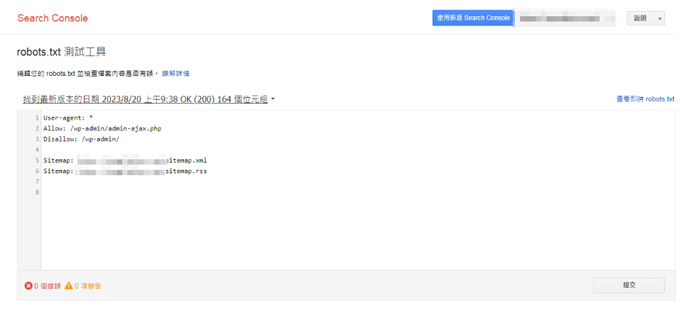
△ You can then test for any issues with the current robots.txt file and view its live content.
【Finally】Is robots.txt Important for SEO Optimization?
The answer is not absolute! First, it's crucial to understand that a robots.txt file is not mandatory for every website. When Googlebot visits a site, it typically first attempts to fetch the robots.txt file to seek crawling permission. If a site lacks a robots.txt file, or robots meta tags, or X-Robots-Tag HTTP headers, Googlebot will still crawl and index the site, but this might lead to inefficient use of the crawl budget.
Conversely, if a website incorrectly uses robots.txt to block search engine crawlers from indexing content, it will undoubtedly negatively impact SEO performance. Therefore, careful planning during the initial website architecture phase is essential. A misstep at the start can have profound long-term consequences.
Arachne Group Limited provides comprehensive one-stop digital business solutions, including web design, online promotion, web hosting & management, system development, and other value-added services to fully meet our clients' business needs. We welcome you to contact us anytime. Arachne Group Limited is your ideal partner for expanding online business opportunities.
Contact Phone: 852-3749 9734
Email Address: [email protected]
Website: https://hkweb.com.hk
What is robots.txt? The Secret to Keeping Pages Hidden from Search Engines
Robots.txt is a plain text file placed in the root directory of a website (e.g., https://www.example.com/robots.txt). Its primary function is to communicate with web crawlers (like search engine bots), instructing them on which content they are allowed to crawl and which they should avoid.In other words, robots.txt acts as the "visitor guidelines" or "traffic signs" provided by a website to crawlers, serving the following core purposes:
Allow or Disallow Crawling: Directs specific crawlers to access or avoid certain directories and files.
Manage Crawler Traffic: Prevents crawling of unimportant, infinite-loop, or private pages, conserving server resources and crawler budget.
Specify Sitemap Location: Informs crawlers of the XML sitemap location via the Sitemap directive, aiding more efficient content indexing.
Does Every Website Need a robots.txt File? Not Necessarily!
Whether a website needs a robots.txt file often depends on its actual requirements and goals. If a site contains content not intended for indexing—such as login/registration pages, admin interfaces, internal search results, or specific file types—it can use robots.txt to restrict crawler access. This ensures search engines focus their "crawl budget" on important pages, enhancing indexing efficiency.If you want search engine crawlers to discover new pages on your site faster, you can also set up a fully open robots.txt file that includes the Sitemap location, actively inviting crawlers to index your content.
Conversely, if your website has few pages and all content is public, omitting a robots.txt file is acceptable, implying default openness to all crawlers. For example, single-page websites without sections needing blocking often operate without a robots.txt file.
How to Set Up robots.txt for a Website? Understanding the Basic Rules
Step 1: Understand the Fundamental Rules of robots.txt FilesTypically, a robots.txt file includes the following directives:
User-agent: Specifies the name of the search engine crawler to which the rules apply. An asterisk (*) usually denotes all crawlers except those specifically named.
Disallow: Prohibits the aforementioned crawler from indexing specific directories or pages under the root domain.
Allow: Permits the aforementioned crawler to index specific directories or pages under the root domain.
Sitemap: Informs the crawler of the website's Sitemap location.
It's important to note that each rule must contain at least one Disallow or Allow entry.
Here are several practical configuration examples:
| Scenario | Example | Explanation |
|---|---|---|
| Block all crawlers from the entire site | User-agent: *Disallow: / |
Note: Un-crawled URLs may still be indexed. |
| Block crawling of specific directories | User-agent: *Disallow: /private/Disallow: /temp/ |
Adding / after a directory name indicates the entire directory. |
| Allow only a specific crawler | User-agent: Googlebot-newsAllow: /User-agent: *Disallow: / |
Grants access only to the Google News crawler. |
| Block specific file types | User-agent: GooglebotDisallow: /*.pdf$ |
Uses $ to match URLs with specific endings. |
| Block Google Images from indexing all pictures | User-agent: Googlebot-ImageDisallow: / |
Applicable for preventing images from appearing in Google Image Search results. |
Step 2: Understand the Limitations of robots.txt File Configuration
Before creating or editing a robots.txt file, it's advisable to understand the following limitations regarding URL blocking methods. Webmasters may consider alternative mechanisms based on website objectives and circumstances to ensure URLs cannot be found via web search:
Not all search engines support robots.txt rules.
While most search engine crawlers follow the directives in a robots.txt file, not every crawler does. Therefore, to ensure specific information remains inaccessible to crawlers, it is recommended to use other methods (such as password-protecting private files on the server) to block access.
Different crawlers may interpret syntax differently.
Although most search engine crawlers adhere to robots.txt rules, their interpretation can vary. Some crawlers might not understand specific directives. Thus, webmasters need to be aware of the robots.txt rules for different crawlers and use appropriate syntax.
Crawlers can still index pages blocked by robots.txt if other sites link to them.
While search engine crawlers typically won't crawl or index content blocked by robots.txt, if links to blocked pages appear elsewhere on the web, crawlers may still index these URLs and even display them in search results. To completely prevent this, consider password-protecting server files, using the noindex meta tag or response header, or removing the pages entirely.
Step 3: Test if robots.txt is Functioning Correctly
Normally, once you save the robots.txt file in your website's root directory, search engine crawlers will automatically find and start using it. However, to ensure the file is accessible to crawlers, don't forget to use a "robots.txt testing tool" for verification after uploading:
△ Log in to https://www.google.com/webmasters/tools/robots-testing-tool and select the verified website property you need to test.
△ You can then test for any issues with the current robots.txt file and view its live content.
【Finally】Is robots.txt Important for SEO Optimization?
The answer is not absolute! First, it's crucial to understand that a robots.txt file is not mandatory for every website. When Googlebot visits a site, it typically first attempts to fetch the robots.txt file to seek crawling permission. If a site lacks a robots.txt file, or robots meta tags, or X-Robots-Tag HTTP headers, Googlebot will still crawl and index the site, but this might lead to inefficient use of the crawl budget.
Conversely, if a website incorrectly uses robots.txt to block search engine crawlers from indexing content, it will undoubtedly negatively impact SEO performance. Therefore, careful planning during the initial website architecture phase is essential. A misstep at the start can have profound long-term consequences.
Arachne Group Limited provides comprehensive one-stop digital business solutions, including web design, online promotion, web hosting & management, system development, and other value-added services to fully meet our clients' business needs. We welcome you to contact us anytime. Arachne Group Limited is your ideal partner for expanding online business opportunities.
Contact Phone: 852-3749 9734
Email Address: [email protected]
Website: https://hkweb.com.hk
MORE BLOG
-

How Should SMEs Allocate Their SEM Budget? A Guide to Google Ads Monthly Spend from HK$5,000 to 30,000
2026/08/28 How Hong Kong SMEs should allocate Google Ads budgets from HK$5,000 to 30,000. Focus on affordable CPL, high-intent search keywords, Smart Bidding learning periods, and practical allocation tables. -

Google August 2026 Spam Update: HK Business Traffic Drop Diagnosis & SEO/GEO Recovery Guide
2026/08/21 Diagnose HK site traffic drop after Google August 2026 Spam Update. Step-by-step SEO and GEO content recovery guide by Arachne Group's SEO experts. -

How Much Should Domain Registration Cost? Uncovering Cost Traps and a Complete Guide to Choosing Domain Registrars
2026/08/18 Discover reasonable .com & .hk domain prices, avoid low first-year traps and lock-in risks. Expert guide to choosing the best domain registrar for Hong Kong businesses.

