


Can Canva Build Websites? Will Canva Replace Hong Kong Web Design Companies?
Yes, you read that right! Canva can now be used to create websites, and the best part is—you don’t need any coding skills. In just a few minutes, you can build a clean and visually appealing online site.
What Is Canva? Can It Really Make Websites?
Canva started as a graphic design platform for creating various types of visual content. With its drag-and-drop interface and layout tools, users can easily produce professional-quality designs.Today, Canva also offers Canva Websites, allowing users to build responsive single-page or multi-page websites in under 30 minutes using a visual editor and a wide selection of templates. Websites can be published under a free Canva subdomain, a custom domain, or a subdomain.
This shows that Canva not only can make websites, but it also dramatically lowers the entry barrier—making it ideal for personal portfolios, event landing pages, and simple promotional sites.
How to Make a Website Using Canva: Step-by-Step Guide
Creating a website on Canva requires only a few simple steps:1. Use a Template to Start
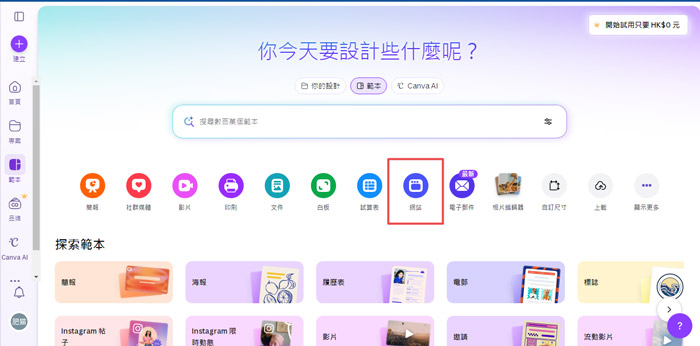
From the top-right corner, select “Create a Design” → “Website.” You can also search “Website” on the homepage and choose from recommended templates. After creating a project, select your preferred template from the left panel to start editing.
2. Convert an Existing Project into a Website
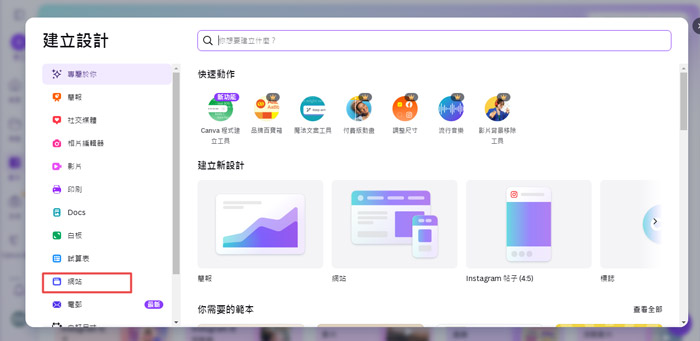
If you’ve started with a presentation or poster, you can easily convert it. Click “Share” → “Website” → “Convert to Website,” and Canva will unlock website design templates.
3. Set Page Structure and Navigation
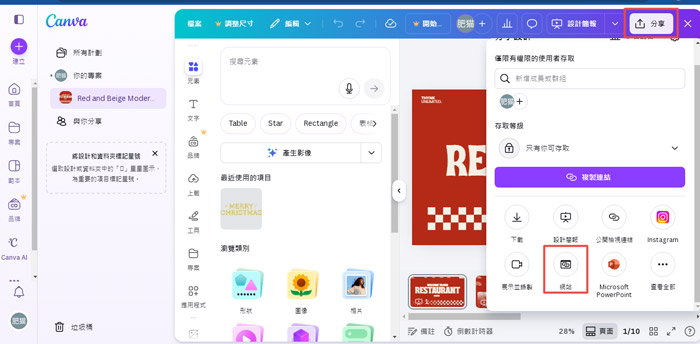
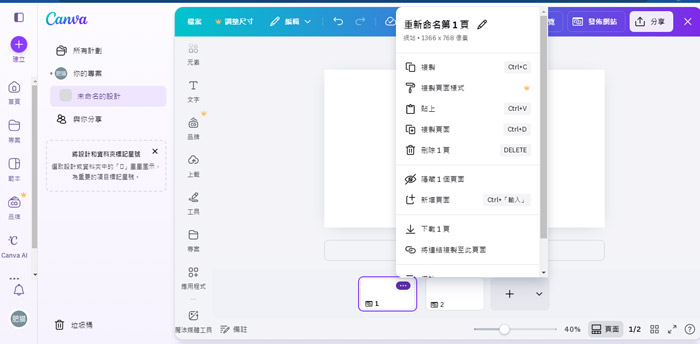
Canva websites are typically single-page layouts, where each “page” appears as a vertical section. Assign “page titles” to create a navigation menu. To rename, click the “...” icon next to each page.
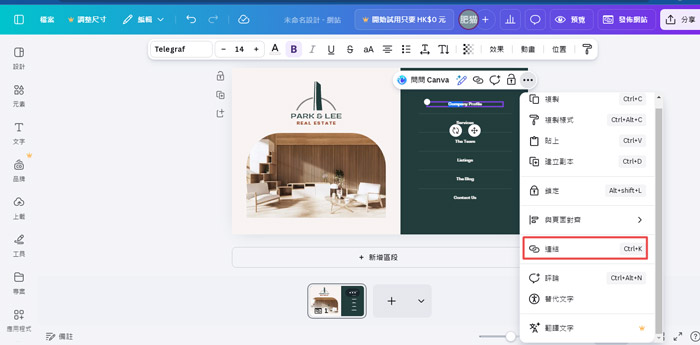
4. Add Internal and External Links
You can add links to text or images for internal scrolling, navigation to other Canva web projects, or external websites.
5. Publish and Adjust Advanced Settings
Once complete, click “Publish Website.” Make sure to enable “Resize for Mobile” (responsive design) and decide whether to include a navigation bar. You can choose a free Canva subdomain (e.g., yourname.my.canva.site) or connect your own domain.
In Advanced Settings, fill in your “Website Title” and “Page Description,” and enable “Search Engine Visibility” for basic SEO. After publishing, your site goes live instantly.
Can Canva Build All Types of Websites? In-Depth Analysis of Its Capabilities
Before deciding whether to use Canva for web design, it’s important to objectively review its pros and cons.Key Advantages
- No coding required: Canva’s drag-and-drop interface allows anyone to design layouts without HTML or CSS knowledge.
- Extensive template library: Hundreds of professional, modern templates that can be quickly customized—often within 30 minutes to a few hours.
- Built-in responsive design: Templates automatically adjust for mobile, tablet, and desktop.
- Cost-effective: Instead of spending tens of thousands of HKD with a design agency, users can subscribe at a low cost with no maintenance fees.
- Design and brand consistency: Canva’s “Brand Kit” helps ensure uniform logos, colors, and typography across all materials—websites, social media, and presentations.
Potential Limitations
- Limited flexibility: Complex features like interactivity, membership systems, or e-commerce functions are not supported.
- Weak SEO capabilities: Only basic metadata fields are available; advanced optimizations (structured data, custom URLs, speed enhancements) are missing.
- Template redundancy: Designs may look similar across users, making it harder to stand out.
- Lack of technical support: Assistance is limited to Canva’s help center; no dedicated support team.
- Ownership and migration issues: Sites are hosted within Canva’s ecosystem, making future platform migration difficult.
Will Canva Replace Hong Kong Web Design Companies? How Should You Choose?
In reality, Canva and Hong Kong web design companies are not direct substitutes—they serve different purposes.Professional web design agencies in Hong Kong typically provide end-to-end services, including brand analysis, UI/UX design, Search Engine Optimization, custom development, maintenance, and security. Their process is systematic, often involving requirement analysis, wireframing, design, development, and testing—aimed at creating a long-term digital asset for your brand.
By contrast, Canva focuses on quick, simple, and visually driven solutions—better suited for short-term or lightweight use cases.
|
Canva Websites |
Hong Kong Web Design Companies |
|
|
Difficulty Level |
Very low; drag-and-drop interface for individuals |
Managed by professional designers and developers |
|
Functionality
|
Fixed templates; limited customization |
Fully custom functions and system development |
|
SEO Performance |
Basic settings only |
Comprehensive technical SEO and analytics for sustainable growth |
|
Design Uniqueness |
Attractive but repetitive templates |
Tailored branding with unique design identity |
|
Maintenance & Support |
Self-service only |
Long-term maintenance, updates, and technical support |
|
Cost |
Free or low subscription fees |
Higher upfront project fees or maintenance contracts |
|
Data Ownership |
Locked to Canva servers |
Full code and data ownership; free hosting choice |
|
Best Use Case |
Personal portfolios, event pages, landing pages |
Corporate websites, e-commerce, membership or booking systems, SEO-driven content |
In summary, Canva is an excellent quick solution provider, while a Hong Kong web design company acts as your long-term digital partner.
If your goal is to create a simple, static page quickly, beautifully, and affordably—with little need for advanced SEO, functions, or brand differentiation—Canva is a great choice.
However, if your website is central to your business, and you value a unique brand image, superior user experience, strong SEO performance, expandable custom features, and professional long-term support, you should consider hiring a Hong Kong web design company.
Choosing a Professional Partner:
When your website is the core of your business, seek a professional Hong Kong web design firm that offers full-cycle service—from consultation to maintenance. Our team of designers and developers not only builds unique websites for clients but also provides continuous management support.
Ultimately, whichever path you choose, defining your goals and needs clearly is the first step toward success. Hopefully, this detailed analysis helps you find the right direction in exploring “Can Canva Make Websites?”—and take your first confident step toward building a successful online presence.
MORE BLOG
-

Hong Kong App UI/UX Design & Interface Optimization Guide: From Problem Diagnosis to Redesign Implementation
2026/09/02 Hong Kong App UI/UX optimization guide: diagnose UI, UX & performance issues, decide on partial fixes or full redesign, localize for HK, and choose the right design partner. -

Spending Heavily on an APP Only for Users to Uninstall Instantly? APP Loading Design & UI/UX Optimization Strategies Hong Kong Businesses Must Prioritize
2026/09/01 Learn why poor APP loading design causes instant uninstalls. Discover 4 loading states, 5 UI/UX principles & metrics tailored for Hong Kong’s weak-network environments. -

Hong Kong Senior-Friendly Landing Page Design Guide: How to Help Seniors and Their Children Understand, Trust and Leave Contact Details More Easily?
2026/08/26 Learn how to design age-friendly landing pages in Hong Kong that help seniors and adult children understand, trust and leave contact details. 5 key UX principles.

